
Abstract
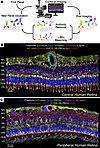
We generated a comparative spatial proteomic atlas of the human and mouse retina using a highly multiplexed immunohistochemistry technique called iterative bleaching extends multiplexity (IBEX). We refined the IBEX workflow by integrating an antibody dissociation option alongside chemical bleaching. This dual strategy enabled removal of the entire antibody complex, permitting the flexible use of antibodies from the same host species across iterative cycles. We coupled this workflow with super-resolution imaging via deconvolution and applied it to the retina of healthy humans and WT mice and the Crb1rd8 mouse model. We successfully imaged over 25 protein markers on human and mouse tissue sections, generating spatial atlases of the major retinal cell populations. Cross-species protein expression was compared to scRNA-seq datasets to identify protein and transcript disparities. Super-resolution IBEX delineated the ultrastructural features of the outer limiting membrane (OLM), identifying CD44 as a core structural component tightly colocalized with a highly organized F-actin belt within Müller glial endfeet. Using the Crb1rd8 mouse model, disruption of this complex was spatially associated with rosette formation and OLM structural failure. In summary, spatial proteomic atlases of the human and mouse retina were used to reveal insights into the arrangement of major retinal cell populations and OLM structure.
Authors
Yuxuan Meng, Jakub Kubiak, Zuzanna Dzieniak, Lorna Fowler, Rose Avient, Jason Hopley, Linyulong Li, Chaoran Li, Yuan Tian, Bruno Charbit, Colin J. Chu
This file is in Adobe Acrobat (PDF) format. If you have not installed and configured the Adobe Acrobat Reader on your system.
Having trouble reading a PDF?
PDFs are designed to be printed out and read, but if you prefer to read them online, you may find it easier if you increase the view size to 125%.
Having trouble saving a PDF?
Many versions of the free Acrobat Reader do not allow Save. You must instead save the PDF from the JCI Online page you downloaded it from. PC users: Right-click on the Download link and choose the option that says something like "Save Link As...". Mac users should hold the mouse button down on the link to get these same options.
Having trouble printing a PDF?
- Try printing one page at a time or to a newer printer.
- Try saving the file to disk before printing rather than opening it "on the fly." This requires that you configure your browser to "Save" rather than "Launch Application" for the file type "application/pdf", and can usually be done in the "Helper Applications" options.
- Make sure you are using the latest version of Adobe's Acrobat Reader.


